

Single line diagram
Automatic Solar SLD Software for Rooftop PV Systems
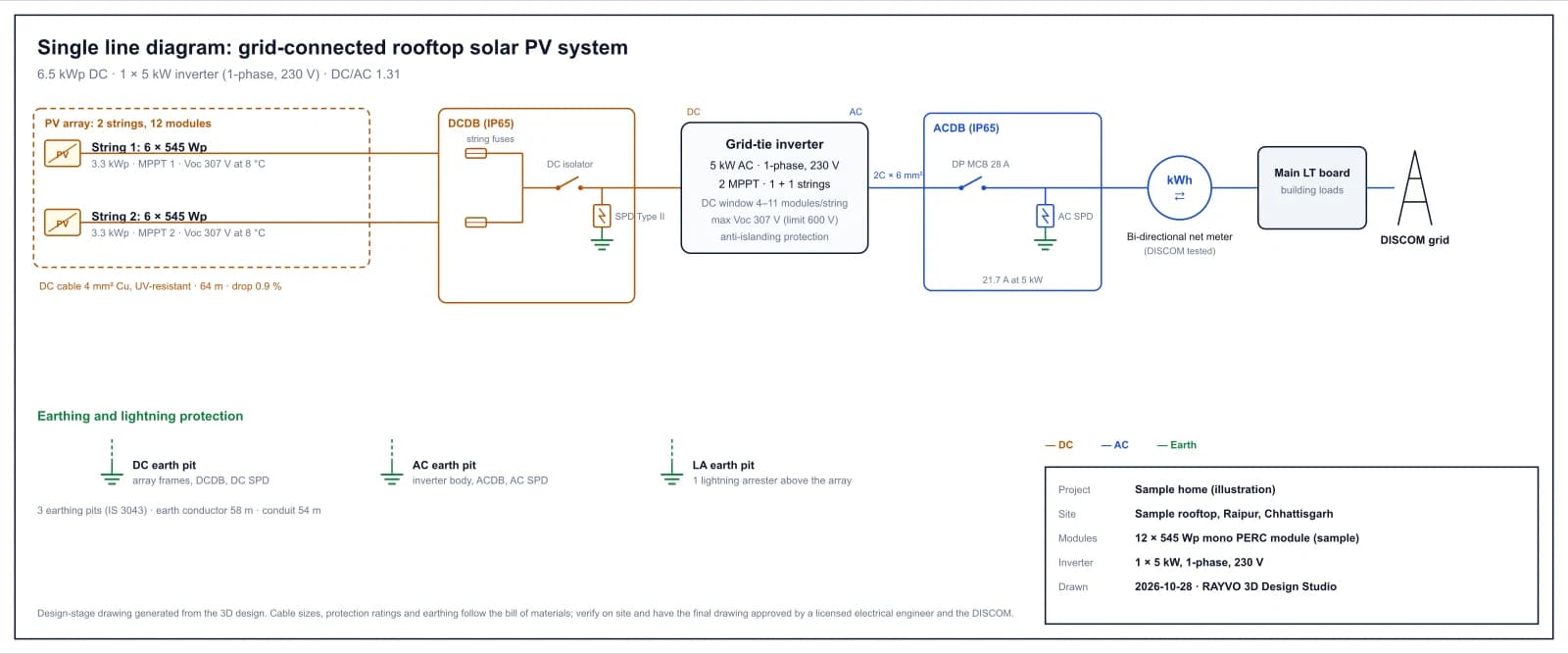
The single line diagram is generated from the design in the RAYVO 3D Design Studio, using the same string plan and bill of materials as the proposal. Change the layout and the diagram changes with it: strings, fuses, isolator, surge protection, inverter, MCB, net meter and earthing, with ratings and cable sizes printed on it.
What it does, how, and what you get
Each capability below says what it does, how it is worked out, what it produces and why it matters to installers and EPC companies.
PV strings as designed
- What it does
- Every string of the array, labelled.
- How it works
- Each string shows its module count and wattage, its kWp, the MPPT it goes to and its open-circuit voltage at the site's coldest temperature. Large arrays are grouped per MPPT so the sheet stays readable.
- What you get
- The PV array block of the diagram.
- Why it matters
- The site team strings the modules exactly as drawn, and the inspector can check the voltages.
DC distribution box
- What it does
- The DC protection between the array and the inverter.
- How it works
- String fuses on each input, a DC isolator and a Type II surge protective device to earth, with the DC cable size, length and voltage drop.
- What you get
- The DCDB block with its devices.
- Why it matters
- DCDB contents are the most common question in a DISCOM inspection.
Inverter block
- What it does
- The inverter with its key ratings.
- How it works
- AC kW, phase and voltage, MPPT count and strings per MPPT, the string window and the highest string voltage against the inverter limit. With more than one inverter the sheet notes that the others are identical.
- What you get
- The inverter block of the diagram.
- Why it matters
- One look confirms the inverter matches the array.
AC side to the grid
- What it does
- Everything from the inverter to the utility.
- How it works
- AC cable size, ACDB with a DP or 4P MCB rated at 1.25 times the AC current and an AC SPD, the bi-directional net meter, the main LT board and the DISCOM grid.
- What you get
- The AC path of the diagram, with ratings.
- Why it matters
- This is the part the DISCOM approves for net metering.
Earthing and lightning protection
- What it does
- Earth pits and the lightning arrester.
- How it works
- DC, AC and lightning arrester earth pits (five above 10 kW), earth conductor length and conduit length from the bill of materials.
- What you get
- The earthing section of the sheet.
- Why it matters
- Earthing is checked at commissioning; the drawing shows what was planned.
Print, PDF and files
- What it does
- A sheet ready to file.
- How it works
- Colour-coded DC, AC and earth lines, a legend and a title block with project, site, modules, inverter and date. Download as SVG or print to an A3 landscape PDF.
- What you get
- SVG and A3 PDF of the single line diagram.
- Why it matters
- The DISCOM file, the site team and the customer all get the same drawing.
What the outputs look like
Screens from the RAYVO 3D Design Studio, pages from its proposals, and sample drawings marked as illustrations.
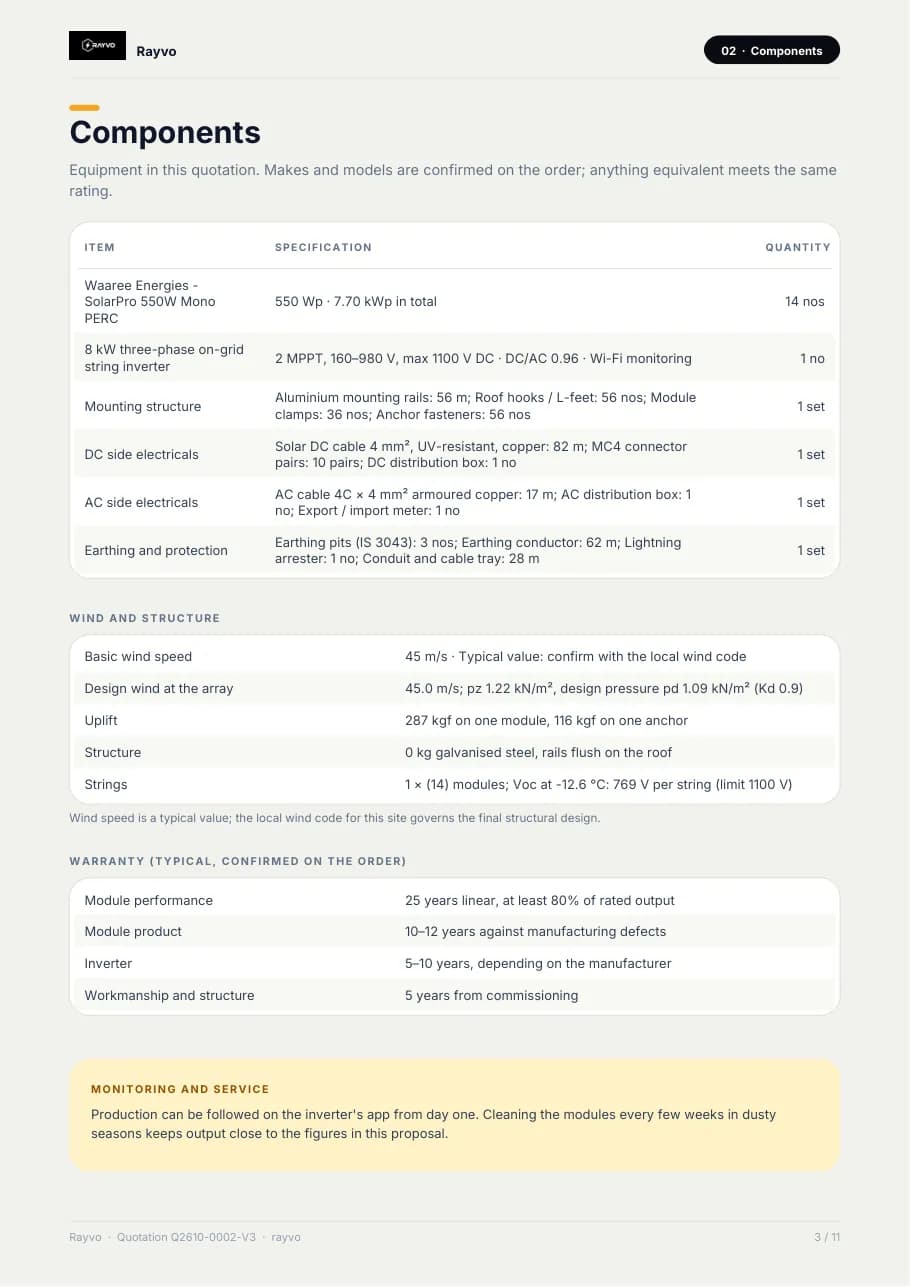
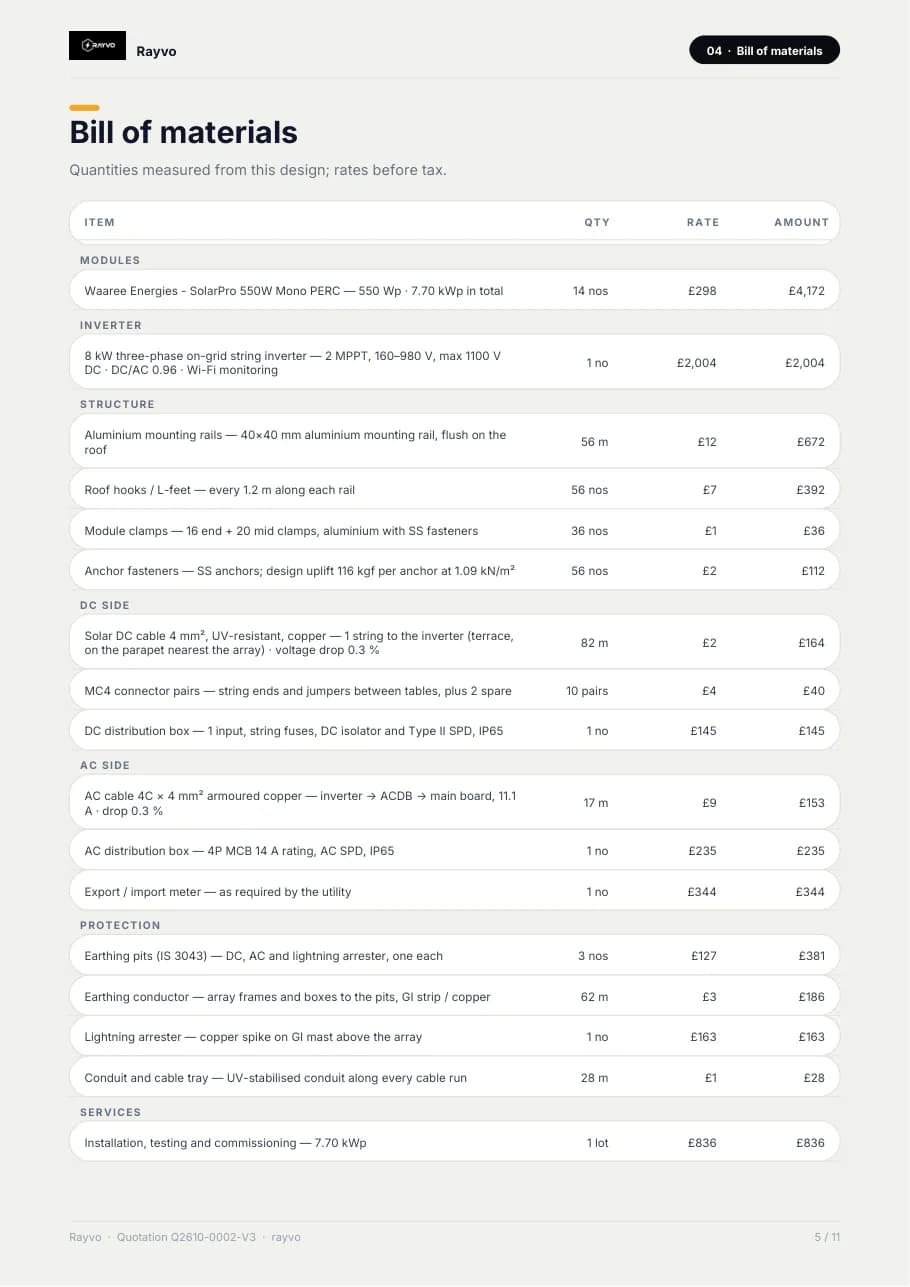
Four steps on one design
- 1
Design the roof
Layout, module and inverter in the studio.
- 2
Open Drawings
The SLD is built from the string plan and BOM.
- 3
Review
Ratings, cable sizes and earthing on one sheet.
- 4
File it
Print to A3 PDF or download the SVG.
The methods behind the numbers
Design-stage figures from recognised methods. Final structural and electrical designs are signed by licensed engineers.
| Source of every value | The design's string plan and bill of materials |
|---|---|
| DC side | Strings, string fuses, DC isolator, Type II SPD, DC cable size, length and drop |
| Inverter | kW, phase, MPPT count, strings per MPPT, voltage window |
| AC side | AC cable, ACDB with MCB at 1.25 × current and SPD, net meter, LT board, grid |
| Earthing | DC, AC and LA pits (IS 3043), conductor and conduit lengths |
| Formats | SVG and A3 landscape PDF |
Automatic Solar SLD questions
It is a design-stage drawing made from the design. A licensed electrical engineer verifies it on site and approves the final drawing, as DISCOMs require.
The diagram is generated from the current design every time, so strings, cable sizes and ratings follow the change.
Yes. The sheet details the first inverter and notes how many identical inverters join the same ACDB.
SVG, which opens in any browser and imports into CAD and design tools, and an A3 landscape PDF through print.
More solar engineering in RAYVO
Ready to run your business smarter?
Bring your solar design, CRM, quotations, projects, finance and business operations together with RAYVO.
Or talk to us on WhatsApp at +91 90399 94090