

Design, engineering and business
Advanced 3D Solar Design, Engineering & Business Management Platform
Plan, visualise, analyse and engineer rooftop solar projects using 3D design and electrical workflows, then connect your designs with quotations, project execution, inventory and business operations.
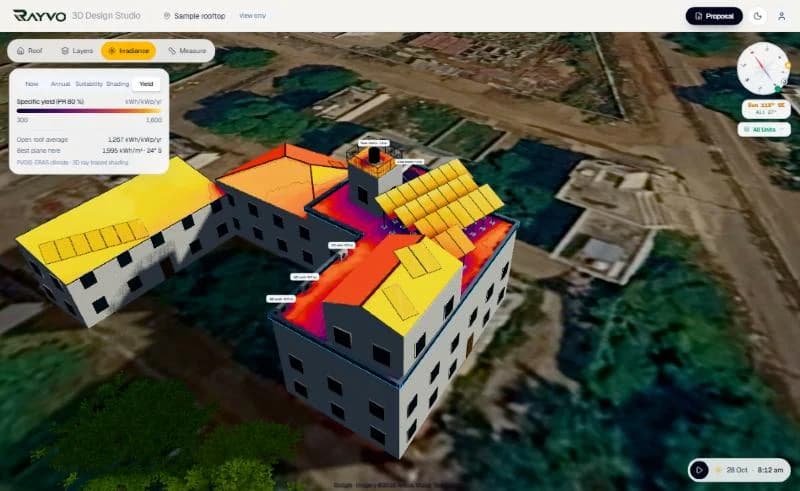
What it does, how, and what you get
Each capability below says what it does, how it is worked out, what it produces and why it matters to installers and EPC companies.
3D rooftop modelling
- What it does
- Draws the building as it stands: any outline, flat, gable, shed and hip roofs, L, T and U shapes, wings, upper storeys, parapets and everything standing on the roof.
- How it works
- Trace the roof over satellite imagery, set heights and pitch, then add water tanks, stair rooms, AC units, trees and neighbouring buildings.
- What you get
- A true-scale 3D model that the layout, shading and structure all work from.
- Why it matters
- Every later number (keep-out areas, shadows, cable runs) is only as good as the model of the roof.
Panel layout
- What it does
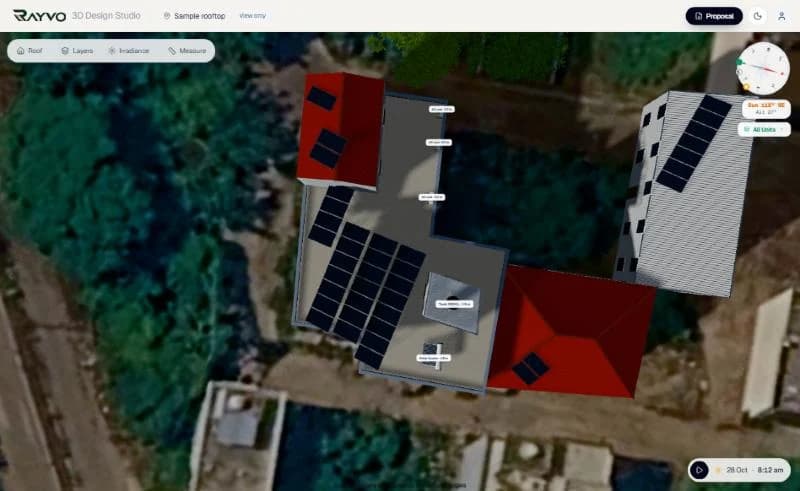
- Places module tables on each roof face with tilt, spacing and one grid direction for the whole design.
- How it works
- Auto-fill a roof or place tables by hand, on the grid or anywhere; rotate or slide the whole array.
- What you get
- Module count, kWp, tilt and facing per table, ready for strings and the bill of materials.
- Why it matters
- Capacity is decided on the roof, not in a spreadsheet; the layout respects tanks, parapets and setbacks.
Sun path and shadow analysis
- What it does
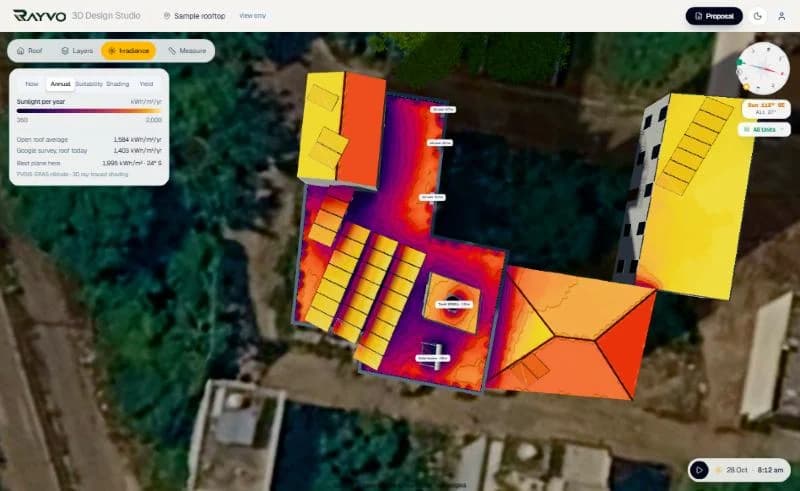
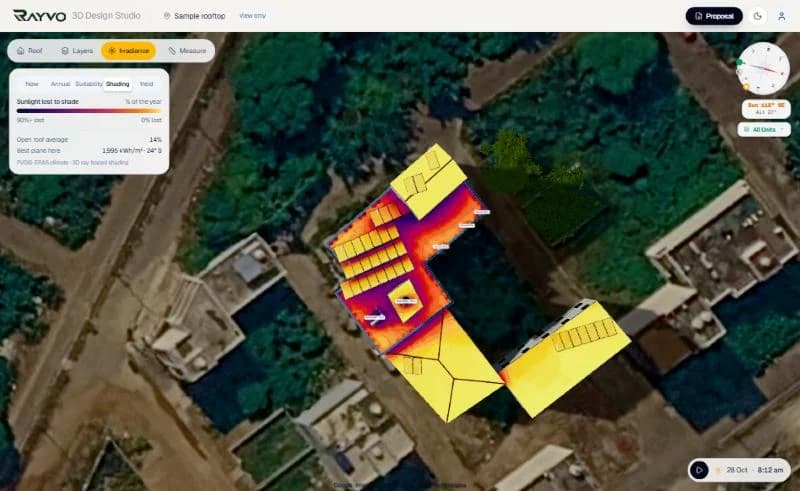
- Shows the real sun path for any day and works out year-round shading from the 3D scene.
- How it works
- The sun is swept across the 21st of every month in half-hour steps and every module is checked against everything that can block it.
- What you get
- Shading loss per table and per month, solar access, and five roof heat maps.
- Why it matters
- A parapet or a water tank can cost a string a tenth of its yield; the design shows where before the panels go up.
Electrical design
- What it does
- Sizes the inverter, strings the modules and sizes DC and AC cables and protection.
- How it works
- Module datasheet values and the site's coldest and hottest temperatures set the string window; cable sizes follow voltage drop and current.
- What you get
- Inverter count and phase, strings per MPPT, cable sizes and lengths, DCDB, ACDB, earthing and lightning protection.
- Why it matters
- Strings outside the inverter's voltage window trip on a cold morning; undersized cables waste energy every day.
Automatic single line diagram
- What it does
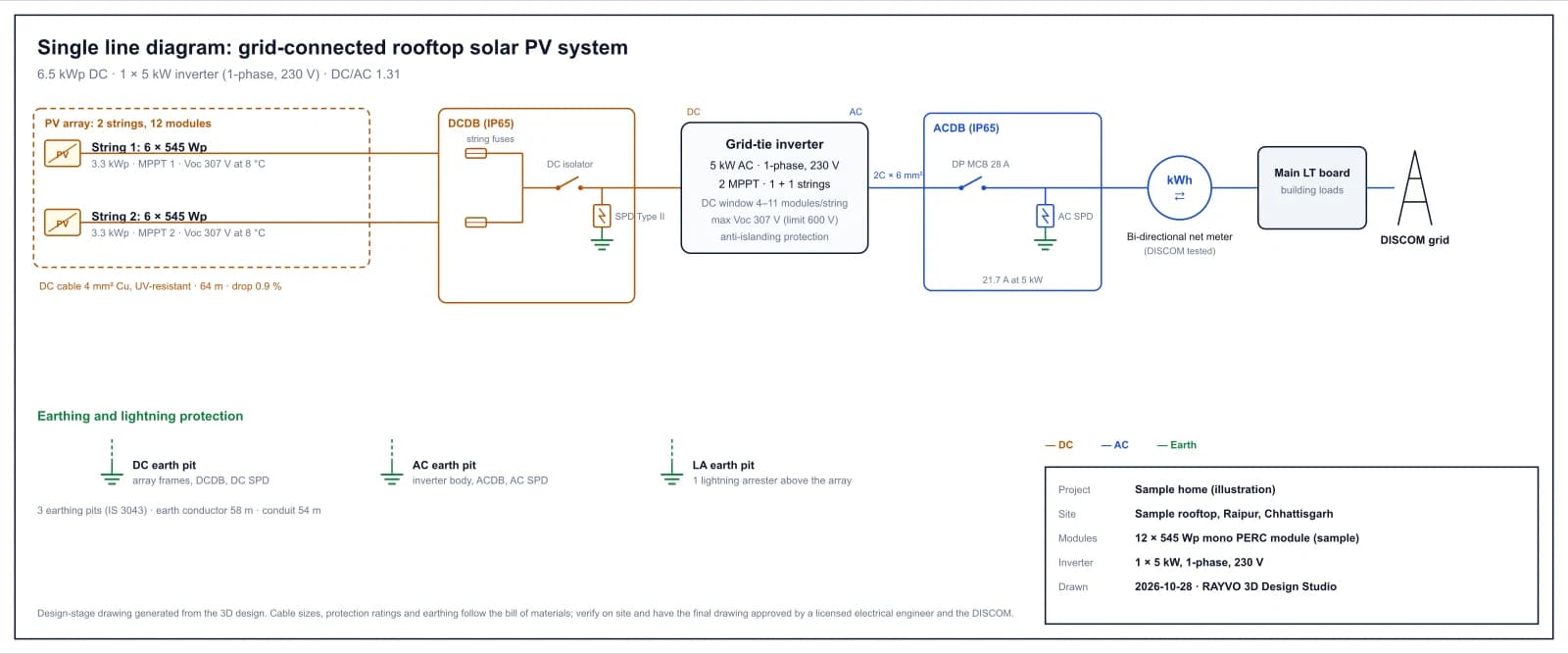
- Draws the SLD of the system from the design: strings, DCDB, inverter, ACDB, net meter, grid and earthing.
- How it works
- Generated from the same string plan and bill of materials, so it changes when the design changes.
- What you get
- A printable SLD (SVG and A3 PDF) with ratings, cable sizes and a title block.
- Why it matters
- DISCOM files and site teams need a diagram that matches what is actually being installed.
CAD / DXF export
- What it does
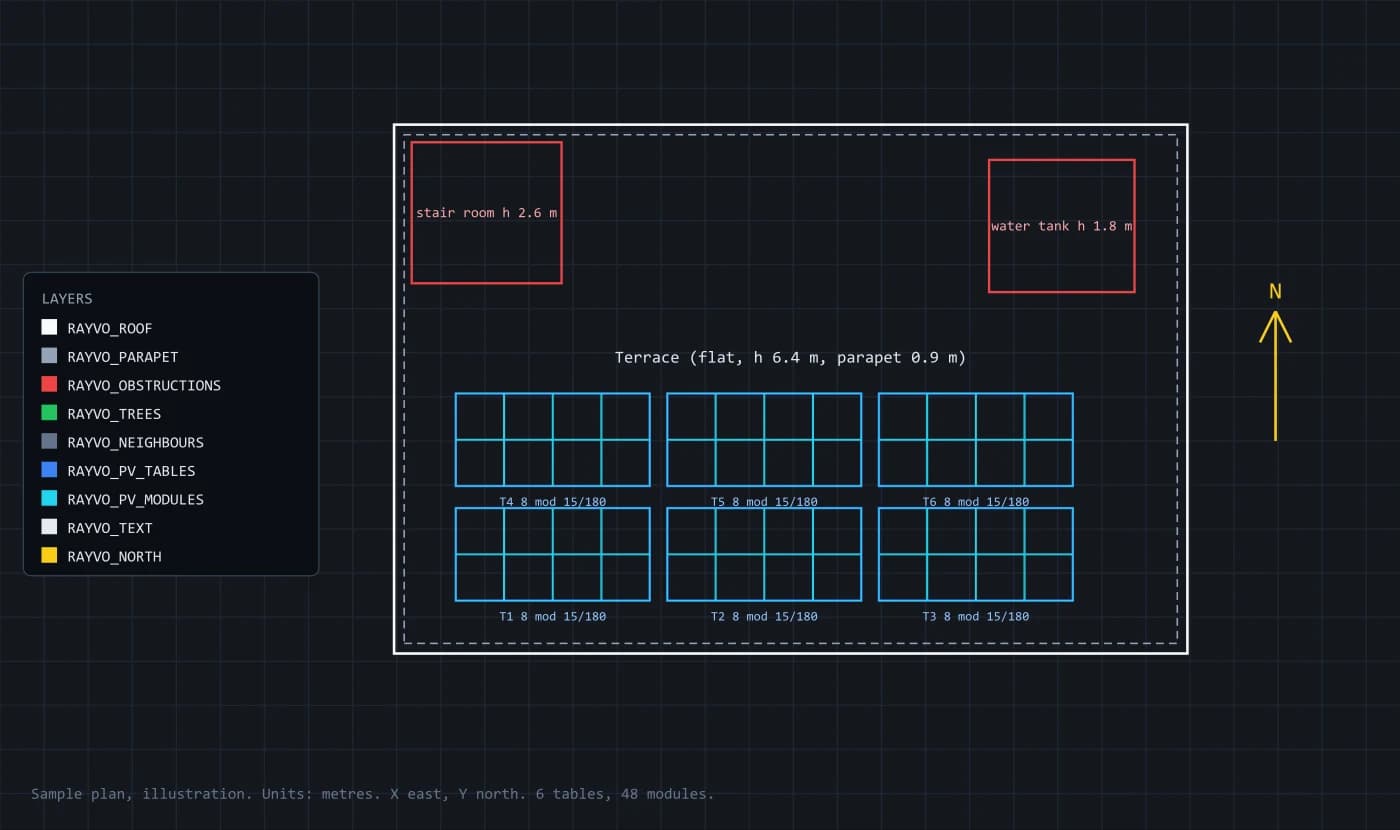
- Exports the roof plan with the PV layout as a DXF drawing.
- How it works
- True scale in metres with separate layers for roofs, parapets, obstructions, trees, neighbours, tables, modules, labels and north.
- What you get
- A DXF file that opens in AutoCAD, BricsCAD, LibreCAD and DraftSight.
- Why it matters
- Structural and electrical consultants work in CAD; they get the layout without redrawing it.
Generation and yield
- What it does
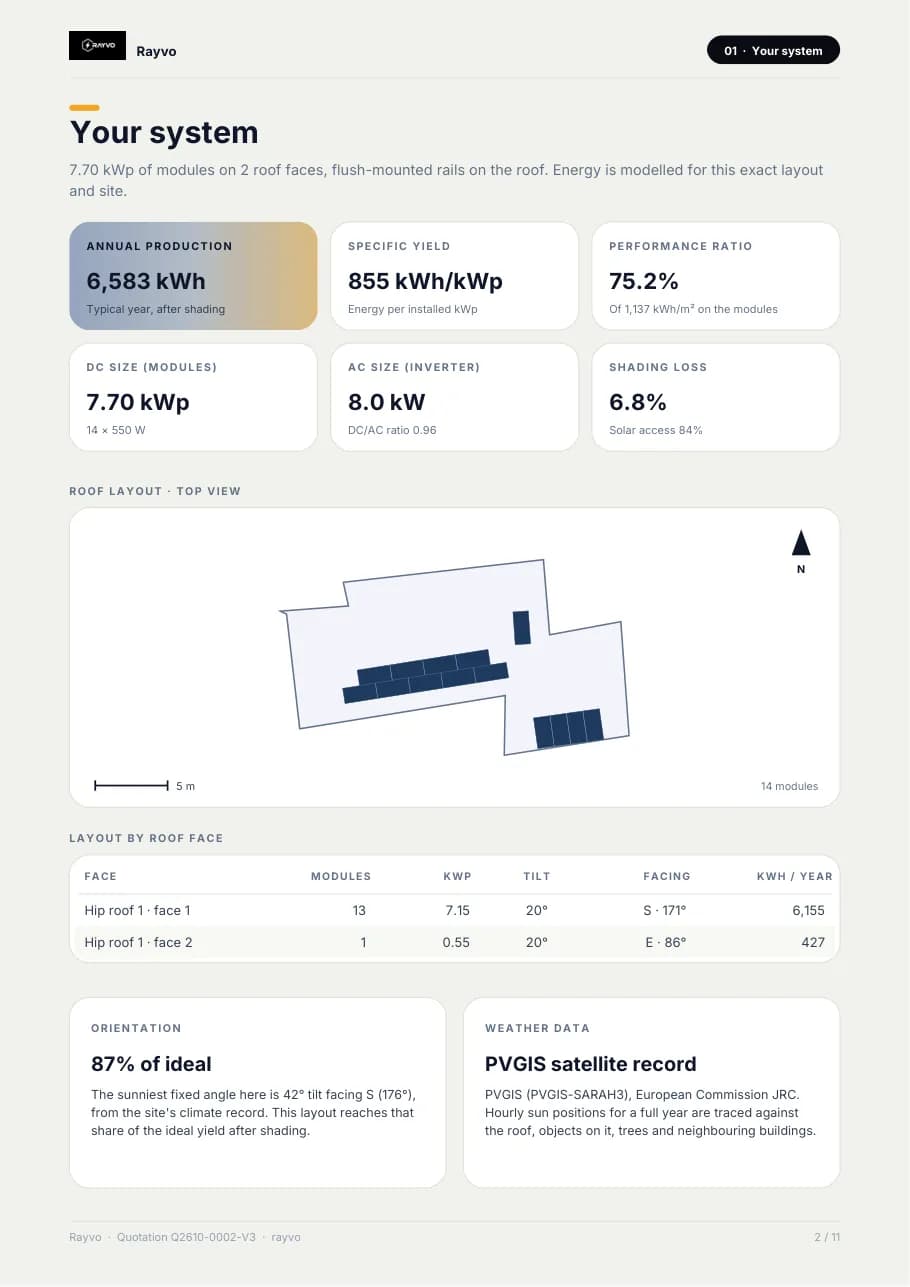
- Estimates annual and monthly generation from the site's climate record and the layout.
- How it works
- PVGIS climate data transposed onto each roof plane, with shading from the 3D scene applied.
- What you get
- Annual kWh, kWh per kWp, month-by-month production and performance ratio.
- Why it matters
- Savings, payback and the customer's trust all start from a generation figure that can be explained.
Design to quotation
- What it does
- Turns the design into a priced proposal and connects it to the rest of the business.
- How it works
- The bill of materials is measured from the design and priced from your rate card; the proposal and quotation carry its total.
- What you get
- A branded proposal PDF, numbered quotation versions, then projects, inventory and invoices in RAYVO.
- Why it matters
- The price, the material list and the installation all come from one design, so nothing is re-typed.
What the outputs look like
Screens from the RAYVO 3D Design Studio, pages from its proposals, and sample drawings marked as illustrations.
Four steps on one design
- 1
Model
Trace the roof, its levels and every object on it.
- 2
Lay out
Place tables, set tilt, spacing and grid direction.
- 3
Engineer
Check shading, strings, cables, wind and yield; get the SLD and DXF.
- 4
Quote and build
Send the proposal, then run the project, stock and billing in RAYVO.
The methods behind the numbers
Design-stage figures from recognised methods. Final structural and electrical designs are signed by licensed engineers.
| Roof types | Flat (RCC terrace), gable, shed and hip, any outline, wings and upper storeys |
|---|---|
| Rooftop objects | Water tanks, stair room (mumty), AC units, solar water heater, dishes, vents, skylights, parapets |
| Shading | Sun swept on the 21st of every month, half-hour steps, every module ray-cast |
| Climate data | PVGIS monthly global and diffuse irradiation |
| Electrical | Temperature-adjusted string sizing, MPPT window, DC/AC ratio, cable sizing by voltage drop |
| Structure | Wind speed from IS 875 (Part 3) for Indian sites, member-by-member steel take-off |
| Drawings | Single line diagram (SVG, A3 PDF); roof plan (DXF R12, metres, layered) |
| Business | Proposal PDF, quotation versions, CRM, projects, inventory, invoices, payroll |
Solar Engineering Platform questions
Both, on one account. The 3D Design Studio does the roof model, layout, shading, electrical design and drawings; the CRM and ERP run leads, quotations, projects, inventory, invoices and payroll. The design's bill of materials and price carry into the quotation.
No. Everything runs in the browser, on a laptop or a phone. If your consultants use CAD, the roof plan exports as a DXF file they can open directly.
They are design-stage figures worked out from the drawn site and recognised methods. A structural engineer still designs the actual roof structure, and a licensed electrical engineer approves the final single line diagram for the DISCOM.
The design studio works for any address with satellite imagery and climate data. Indian sites get IS 875 wind speeds, DCR and non-DCR module pricing and PM Surya Ghar subsidy rules; other markets use their own currency and tariffs.
More solar engineering in RAYVO
Ready to run your business smarter?
Bring your solar design, CRM, quotations, projects, finance and business operations together with RAYVO.
Or talk to us on WhatsApp at +91 90399 94090